# Template function examples
This topic provides examples of how to use Replicated template functions in various common use cases. For more information about working with Replicated template functions, including the supported syntax and the types of files where Replicated template functions can be used, see [About Replicated Template Functions](template-functions-about).
## Overview
Replicated template functions are based on the Go text/template library. All functionality of the Go templating language, including if statements, loops, and variables, is supported with Replicated template functions. For more information, see [text/template](https://golang.org/pkg/text/template/) in the Go documentation.
Additionally, Replicated template functions can be used with all functions in the Sprig library. Sprig provides several template functions for the Go templating language, such as type conversion, string, and integer math functions. For more information, see [Sprig Function Documentation](https://masterminds.github.io/sprig/).
Common use cases for Replicated template functions include rendering values during installation or upgrade, such as:
* Customer-specific license field values
* User-provided configuration values
* Information about the customer environment, such the number of nodes or the Kubernetes version in the cluster where the application is installed
* Random strings
Replicated template functions can also be used to work with integer, boolean, float, and string values, such as doing mathematical operations, trimming leading and trailing spaces, or converting string values to integers or booleans.
For examples demonstrating these use cases and more, see the sections below.
## Comparison examples
This section includes examples of how to use Replicated template functions to compare different types of data.
### Boolean comparison
Boolean values can be used in comparisons to evaluate if a given statement is true or false. Because many Replicated template functions return string values, comparing boolean values often requires using the KOTS [ParseBool](/reference/template-functions-static-context#parsebool) template function to return the boolean represented by the string.
One common use case for working with boolean values is to check that a given field is present in the customer's license. For example, you might need to show a configuration option on the KOTS Admin Console **Config** page only when the customer's license has a certain entitlement.
The following example creates a conditional statement in the KOTS Config custom resource that evaluates to true when a specified license field is present in the customer's license _and_ the customer enables a specified configuration option on the Admin Console **Config** page.
```yaml
# KOTS Config custom resource
apiVersion: kots.io/v1beta1
kind: Config
metadata:
name: config-sample
spec:
groups:
- name: example_group
title: Example Config
items:
- name: radio_example
title: Select One
type: radio
items:
- name: option_one
title: Option One
- name: option_two
title: Option Two
- name: conditional_item
title: Conditional Item
type: text
# Display this item only when the customer enables the option_one config field *and*
# has the feature-1 entitlement in their license
when: repl{{ and (LicenseFieldValue "feature-1" | ParseBool) (ConfigOptionEquals "radio_example" "option_one")}}
```
This example uses the following Replicated template functions:
* [LicenseFieldValue](/reference/template-functions-license-context#licensefieldvalue) to return the string value of a boolean type license field named `feature-1`
:::note
The LicenseFieldValue template function always returns a string, regardless of the license field type.
:::
* [ParseBool](/reference/template-functions-static-context#parsebool) to convert the string returned by the LicenseFieldValue template function to a boolean
* [ConfigOptionEquals](/reference/template-functions-config-context#configoptionequals) to return a boolean that evaluates to true if the configuration option value is equal to the supplied value
### Integer comparison
Integer values can be compared using operators such as greater than, less than, equal to, and so on. Because many Replicated template functions return string values, working with integer values often requires using another function to return the integer represented by the string, such as:
* KOTS [ParseInt](/reference/template-functions-static-context#parseint), which returns the integer value represented by the string with the option to provide a `base` other than 10
* Sprig [atoi](https://masterminds.github.io/sprig/conversion.html), which is equivalent to ParseInt(s, 10, 0), converted to type integer
A common use case for comparing integer values with Replicated template functions is to display different configuration options on the KOTS Admin Console **Config** page depending on integer values from the customer's license. For example, licenses might include an entitlement that defines the number of seats the customer is entitled to. In this case, it can be useful to conditionally display or hide certain fields on the **Config** page depending on the customer's team size.
The following example uses:
* KOTS [LicenseFieldValue](/reference/template-functions-license-context#licensefieldvalue) template function to evaluate the number of seats permitted by the license
* Sprig [atoi](https://masterminds.github.io/sprig/conversion.html) function to convert the string values returned by LicenseFieldValue to integers
* [Go binary comparison operators](https://pkg.go.dev/text/template#hdr-Functions) `gt`, `lt`, `ge`, and `le` to compare the integers
```yaml
# KOTS Config custom resource
apiVersion: kots.io/v1beta1
kind: Config
metadata:
name: config-sample
spec:
groups:
- name: example_group
title: Example Config
items:
- name: small
title: Small (100 or Fewer Seats)
type: text
default: Default for small teams
# Use le and atoi functions to display this config item
# only when the value of the numSeats entitlement is
# less than or equal to 100
when: repl{{ le (atoi (LicenseFieldValue "numSeats")) 100 }}
- name: medium
title: Medium (101-1000 Seats)
type: text
default: Default for medium teams
# Use ge, le, and atoi functions to display this config item
# only when the value of the numSeats entitlement is
# greater than or equal to 101 and less than or equal to 1000
when: repl{{ (and (ge (atoi (LicenseFieldValue "numSeats")) 101) (le (atoi (LicenseFieldValue "numSeats")) 1000)) }}
- name: large
title: Large (More Than 1000 Seats)
type: text
default: Default for large teams
# Use gt and atoi functions to display this config item
# only when the value of the numSeats entitlement is
# greater than 1000
when: repl{{ gt (atoi (LicenseFieldValue "numSeats")) 1000 }}
```
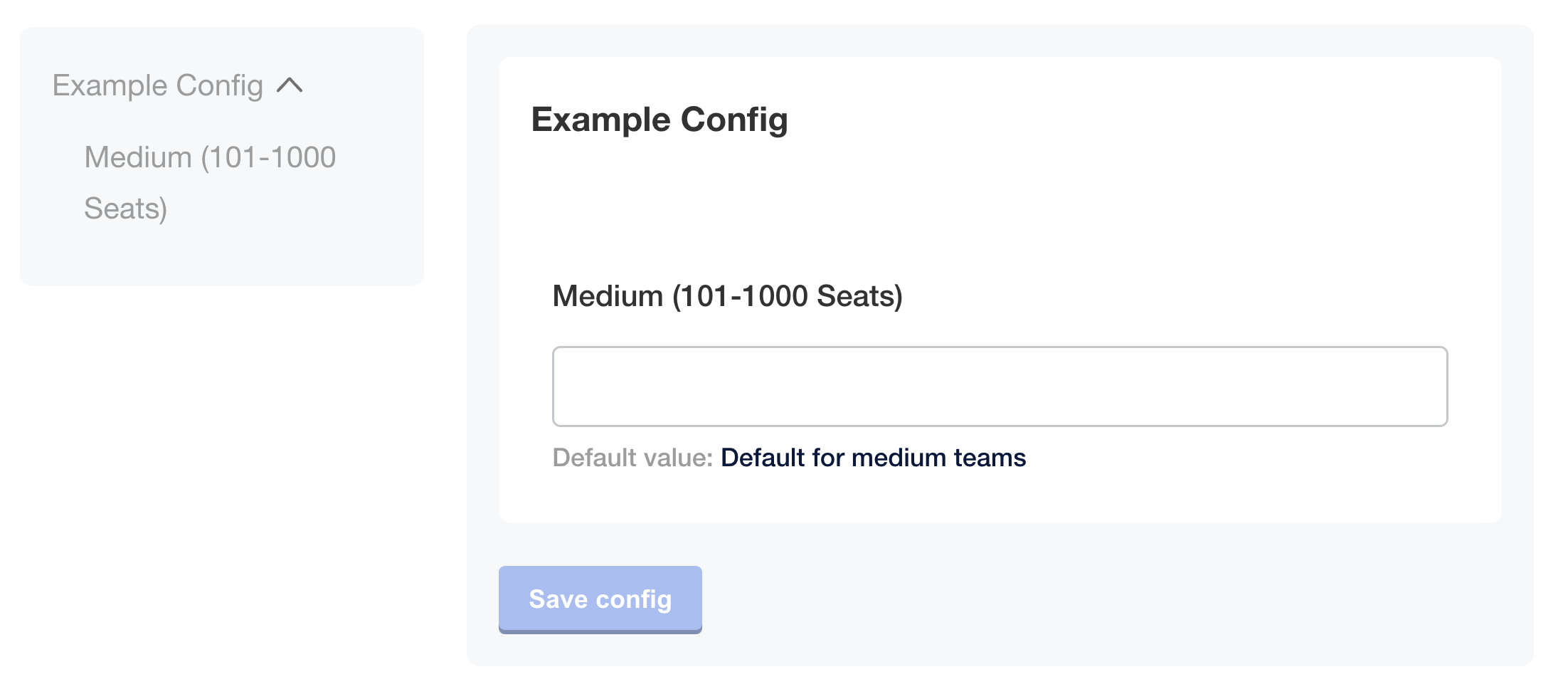
As shown in the image below, if the user's license contains `numSeats: 150`, then the `medium` item is displayed on the **Config** page and the `small` and `large` items are not displayed:
 [View a larger version of this image](/images/config-example-numseats.png)
### String comparison
A common use case for string comparison is to compare the rendered value of a Replicated template function against a string to conditionally show or hide fields on the KOTS Admin Console **Config** page depending on details about the customer's environment. For example, a string comparison can be used to check the Kubernetes distribution of the cluster where an application is deployed.
The following example uses:
* KOTS [Distribution](/reference/template-functions-static-context#distribution) template function to return the Kubernetes distribution of the cluster where KOTS is running
* [eq](https://pkg.go.dev/text/template#hdr-Functions) (_equal_) Go binary operator to compare the rendered value of the Distribution template function to a string, then return the boolean truth of the comparison
```yaml
# KOTS Config custom resource
apiVersion: kots.io/v1beta1
kind: Config
metadata:
name: config-sample
spec:
groups:
- name: example_settings
title: My Example Config
description: Example fields for using Distribution template function
items:
- name: gke_distribution
type: label
title: "You are deploying to GKE"
# Use the eq binary operator to check if the rendered value
# of the KOTS Distribution template function is equal to gke
when: repl{{ eq Distribution "gke" }}
- name: openshift_distribution
type: label
title: "You are deploying to OpenShift"
when: repl{{ eq Distribution "openShift" }}
- name: eks_distribution
type: label
title: "You are deploying to EKS"
when: repl{{ eq Distribution "eks" }}
...
```
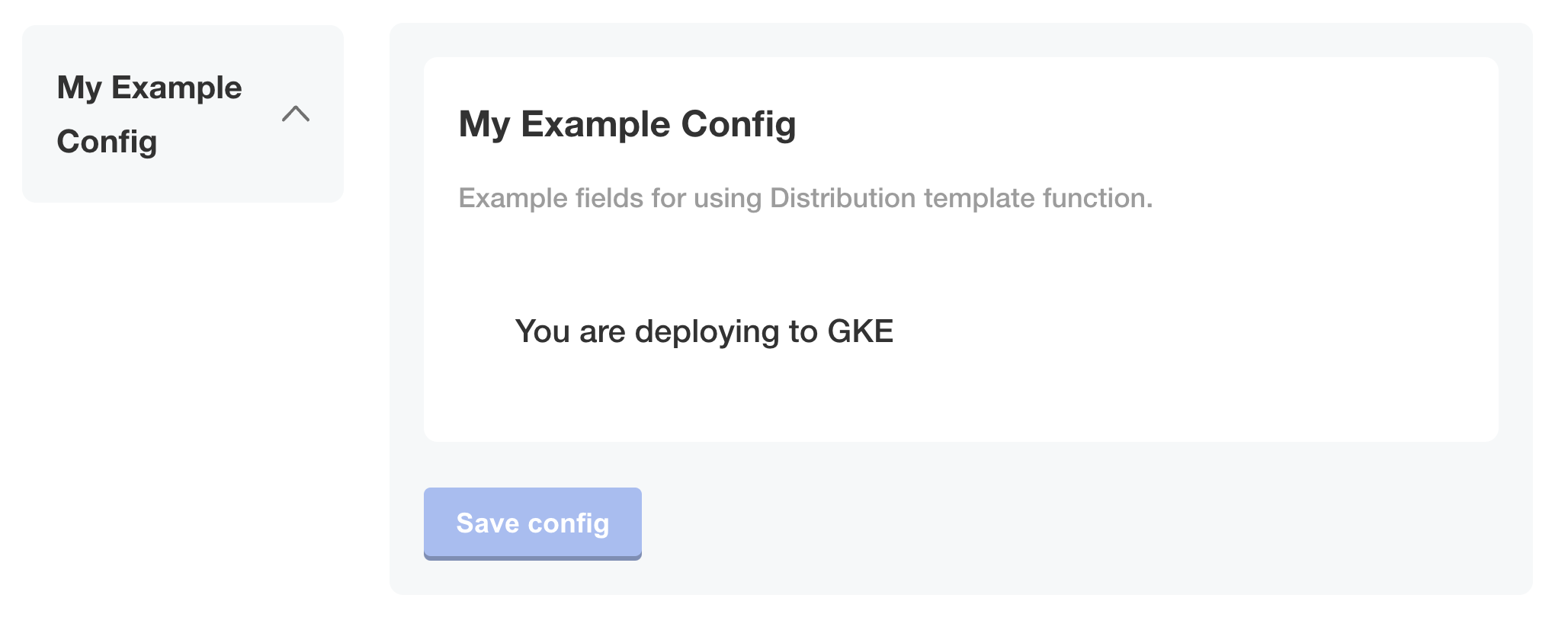
The following image shows how only the `gke_distribution` item is displayed on the **Config** page when KOTS is running in a GKE cluster:
[View a larger version of this image](/images/config-example-numseats.png)
### String comparison
A common use case for string comparison is to compare the rendered value of a Replicated template function against a string to conditionally show or hide fields on the KOTS Admin Console **Config** page depending on details about the customer's environment. For example, a string comparison can be used to check the Kubernetes distribution of the cluster where an application is deployed.
The following example uses:
* KOTS [Distribution](/reference/template-functions-static-context#distribution) template function to return the Kubernetes distribution of the cluster where KOTS is running
* [eq](https://pkg.go.dev/text/template#hdr-Functions) (_equal_) Go binary operator to compare the rendered value of the Distribution template function to a string, then return the boolean truth of the comparison
```yaml
# KOTS Config custom resource
apiVersion: kots.io/v1beta1
kind: Config
metadata:
name: config-sample
spec:
groups:
- name: example_settings
title: My Example Config
description: Example fields for using Distribution template function
items:
- name: gke_distribution
type: label
title: "You are deploying to GKE"
# Use the eq binary operator to check if the rendered value
# of the KOTS Distribution template function is equal to gke
when: repl{{ eq Distribution "gke" }}
- name: openshift_distribution
type: label
title: "You are deploying to OpenShift"
when: repl{{ eq Distribution "openShift" }}
- name: eks_distribution
type: label
title: "You are deploying to EKS"
when: repl{{ eq Distribution "eks" }}
...
```
The following image shows how only the `gke_distribution` item is displayed on the **Config** page when KOTS is running in a GKE cluster:
 ### Not equal to comparison
It can be useful to compare the rendered value of a Replicated template function against another value to check if the two values are different. For example, you can conditionally show fields on the KOTS Admin Console **Config** page only when the Kubernetes distribution of the cluster where the application is deployed is _not_ [Replicated embedded cluster](/embedded-cluster/v3/embedded-overview).
In the example below, the `ingress_type` field is displayed on the **Config** page only when the distribution of the cluster is _not_ [Replicated Embedded Cluster](/embedded-cluster/v3/embedded-overview). This ensures that only users deploying to their own existing cluster are able to select the method for ingress.
The following example uses:
* KOTS [Distribution](/reference/template-functions-static-context#distribution) template function to return the Kubernetes distribution of the cluster where KOTS is running
* [ne](https://pkg.go.dev/text/template#hdr-Functions) (_not equal_) Go binary operator to compare the rendered value of the Distribution template function to a string, then return `true` if the values are not equal to one another
```yaml
apiVersion: kots.io/v1beta1
kind: Config
metadata:
name: config
spec:
groups:
# Ingress settings
- name: ingress_settings
title: Ingress Settings
description: Configure Ingress
items:
- name: ingress_type
title: Ingress Type
help_text: |
Select how traffic will ingress to the appliction.
type: radio
items:
- name: ingress_controller
title: Ingress Controller
- name: load_balancer
title: Load Balancer
default: "ingress_controller"
required: true
when: 'repl{{ ne Distribution "embedded-cluster" }}'
# Database settings
- name: database_settings
title: Database
items:
- name: postgres_type
help_text: Would you like to use an embedded postgres instance, or connect to an external instance that you manage?
type: radio
title: Postgres
default: embedded_postgres
items:
- name: embedded_postgres
title: Embedded Postgres
- name: external_postgres
title: External Postgres
```
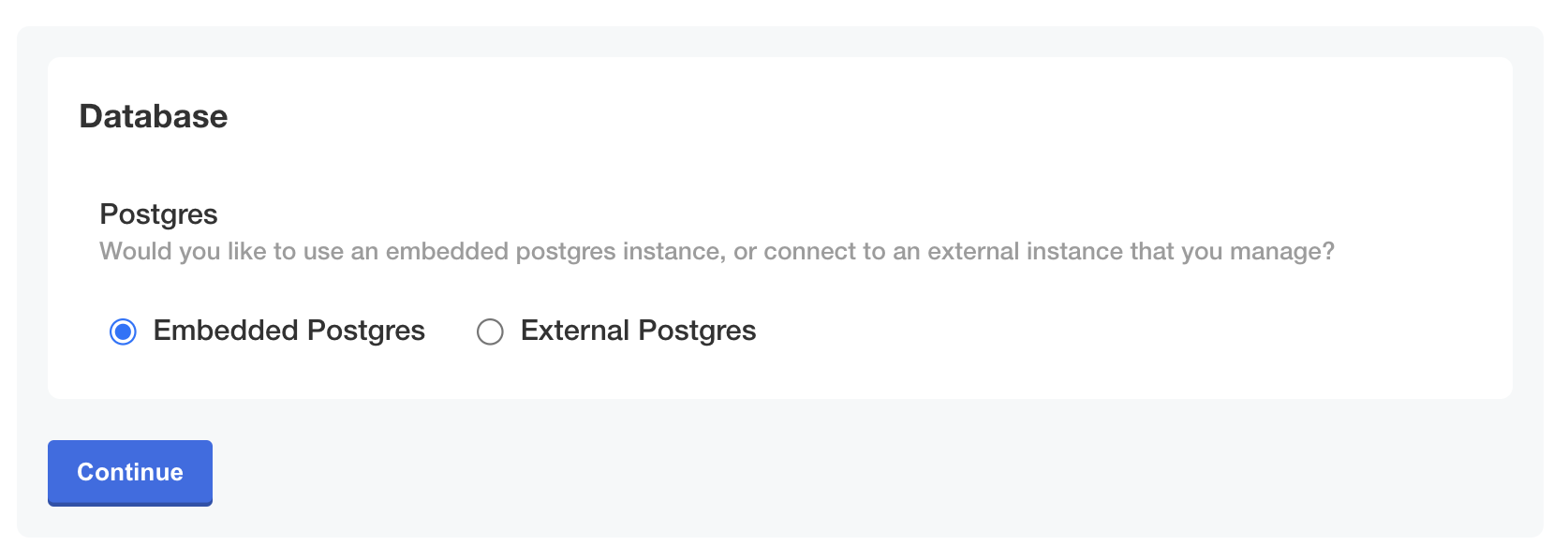
The following image shows how the `ingress_type` field is hidden when the distribution of the cluster is `embedded-cluster`. Only the `postgres_type` item is displayed:
### Not equal to comparison
It can be useful to compare the rendered value of a Replicated template function against another value to check if the two values are different. For example, you can conditionally show fields on the KOTS Admin Console **Config** page only when the Kubernetes distribution of the cluster where the application is deployed is _not_ [Replicated embedded cluster](/embedded-cluster/v3/embedded-overview).
In the example below, the `ingress_type` field is displayed on the **Config** page only when the distribution of the cluster is _not_ [Replicated Embedded Cluster](/embedded-cluster/v3/embedded-overview). This ensures that only users deploying to their own existing cluster are able to select the method for ingress.
The following example uses:
* KOTS [Distribution](/reference/template-functions-static-context#distribution) template function to return the Kubernetes distribution of the cluster where KOTS is running
* [ne](https://pkg.go.dev/text/template#hdr-Functions) (_not equal_) Go binary operator to compare the rendered value of the Distribution template function to a string, then return `true` if the values are not equal to one another
```yaml
apiVersion: kots.io/v1beta1
kind: Config
metadata:
name: config
spec:
groups:
# Ingress settings
- name: ingress_settings
title: Ingress Settings
description: Configure Ingress
items:
- name: ingress_type
title: Ingress Type
help_text: |
Select how traffic will ingress to the appliction.
type: radio
items:
- name: ingress_controller
title: Ingress Controller
- name: load_balancer
title: Load Balancer
default: "ingress_controller"
required: true
when: 'repl{{ ne Distribution "embedded-cluster" }}'
# Database settings
- name: database_settings
title: Database
items:
- name: postgres_type
help_text: Would you like to use an embedded postgres instance, or connect to an external instance that you manage?
type: radio
title: Postgres
default: embedded_postgres
items:
- name: embedded_postgres
title: Embedded Postgres
- name: external_postgres
title: External Postgres
```
The following image shows how the `ingress_type` field is hidden when the distribution of the cluster is `embedded-cluster`. Only the `postgres_type` item is displayed:
 [View a larger version of this image](/images/config-example-distribution-not-ec.png)
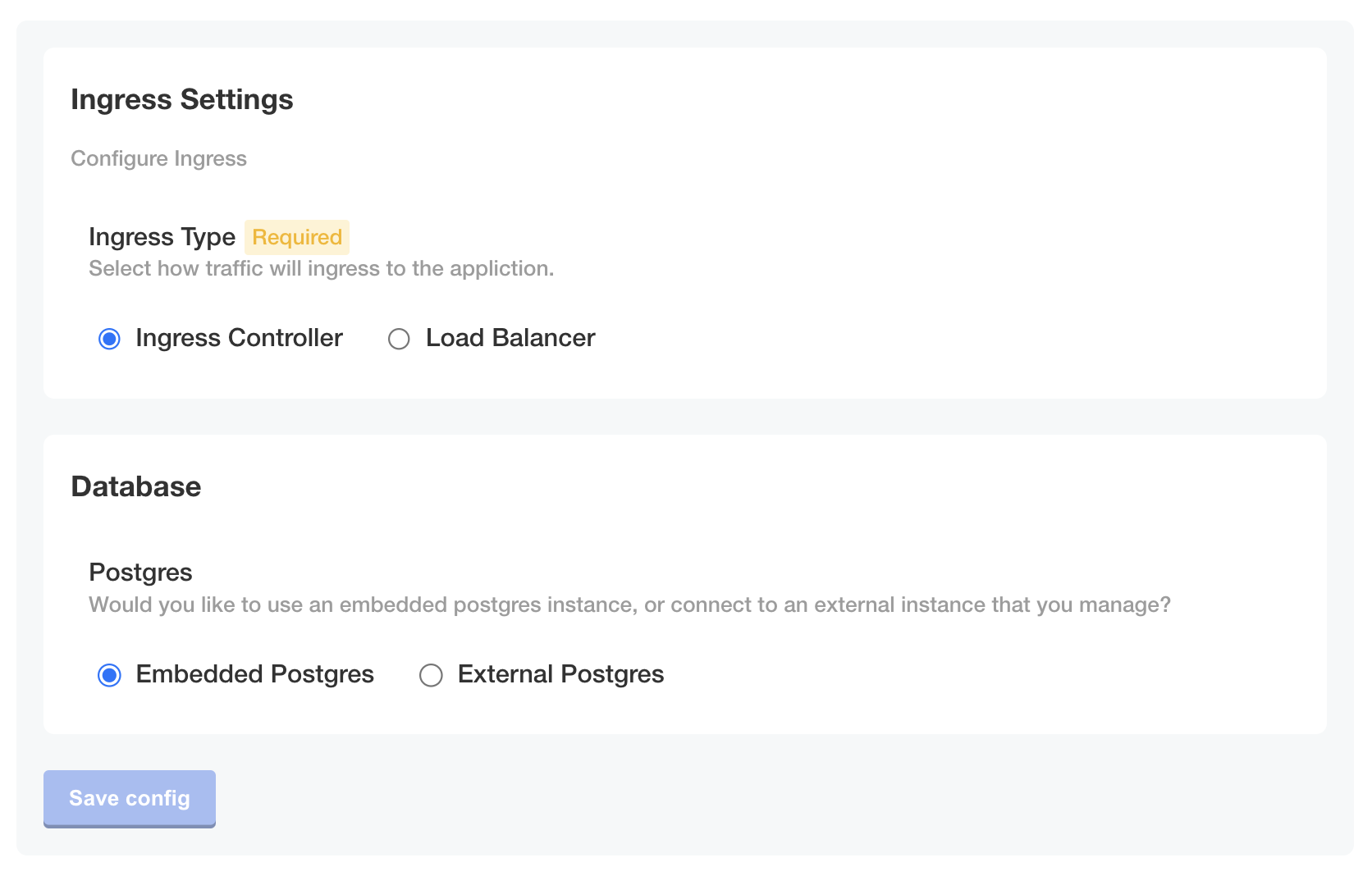
Conversely, when the distribution of the cluster is not `embedded-cluster`, both fields are displayed:
[View a larger version of this image](/images/config-example-distribution-not-ec.png)
Conversely, when the distribution of the cluster is not `embedded-cluster`, both fields are displayed:
 [View a larger version of this image](/images/config-example-distribution-not-ec-2.png)
### Logical AND comparison
Logical comparisons such as AND, OR, and NOT can be used with Replicated template functions. A common use case for logical AND comparisons is to construct more complex conditional statements where it is necessary that two different conditions are both true.
The following example shows how to use an `and` operator that evaluates to true when two different configuration options on the Admin Console **Config** page are both enabled. This example uses the KOTS [ConfigOptionEquals](/reference/template-functions-config-context#configoptionequals) template function to return a boolean that evaluates to true if the configuration option value is equal to the supplied value.
```yaml
# KOTS Config custom resource
apiVersion: kots.io/v1beta1
kind: Config
metadata:
name: config-sample
spec:
groups:
- name: example_group
title: Example Config
items:
- name: radio_example
title: Select One Example
type: radio
items:
- name: option_one
title: Option One
- name: option_two
title: Option Two
- name: boolean_example
title: Boolean Example
type: bool
default: "0"
- name: conditional_item
title: Conditional Item
type: text
# Display this item only when *both* specified config options are enabled
when: repl{{ and (ConfigOptionEquals "radio_example" "option_one") (ConfigOptionEquals "boolean_example" "1")}}
```
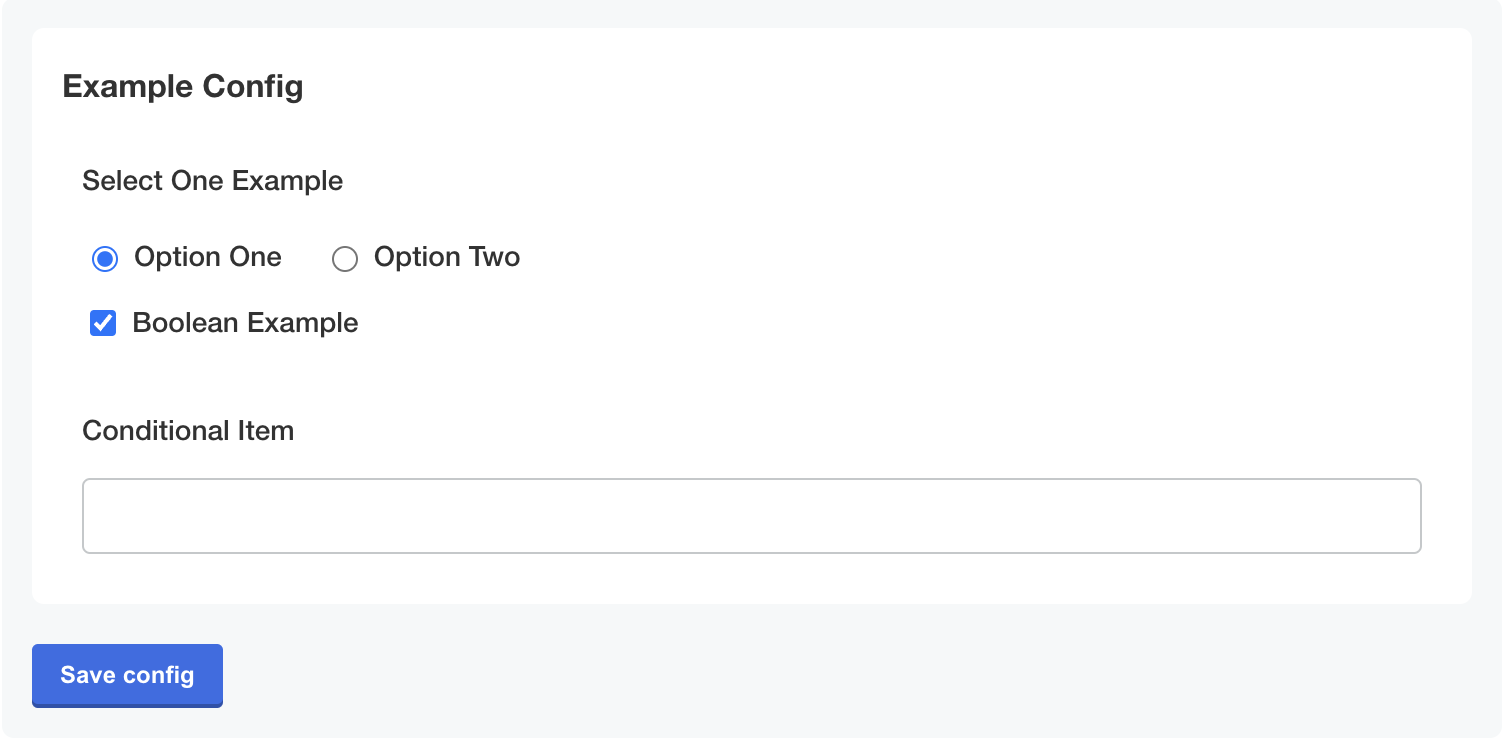
As shown below, when both `Option One` and `Boolean Example` are selected, the conditional statement evaluates to true and the `Conditional Item` field is displayed:
[View a larger version of this image](/images/config-example-distribution-not-ec-2.png)
### Logical AND comparison
Logical comparisons such as AND, OR, and NOT can be used with Replicated template functions. A common use case for logical AND comparisons is to construct more complex conditional statements where it is necessary that two different conditions are both true.
The following example shows how to use an `and` operator that evaluates to true when two different configuration options on the Admin Console **Config** page are both enabled. This example uses the KOTS [ConfigOptionEquals](/reference/template-functions-config-context#configoptionequals) template function to return a boolean that evaluates to true if the configuration option value is equal to the supplied value.
```yaml
# KOTS Config custom resource
apiVersion: kots.io/v1beta1
kind: Config
metadata:
name: config-sample
spec:
groups:
- name: example_group
title: Example Config
items:
- name: radio_example
title: Select One Example
type: radio
items:
- name: option_one
title: Option One
- name: option_two
title: Option Two
- name: boolean_example
title: Boolean Example
type: bool
default: "0"
- name: conditional_item
title: Conditional Item
type: text
# Display this item only when *both* specified config options are enabled
when: repl{{ and (ConfigOptionEquals "radio_example" "option_one") (ConfigOptionEquals "boolean_example" "1")}}
```
As shown below, when both `Option One` and `Boolean Example` are selected, the conditional statement evaluates to true and the `Conditional Item` field is displayed:
 [View a larger version of this image](/images/conditional-item-true.png)
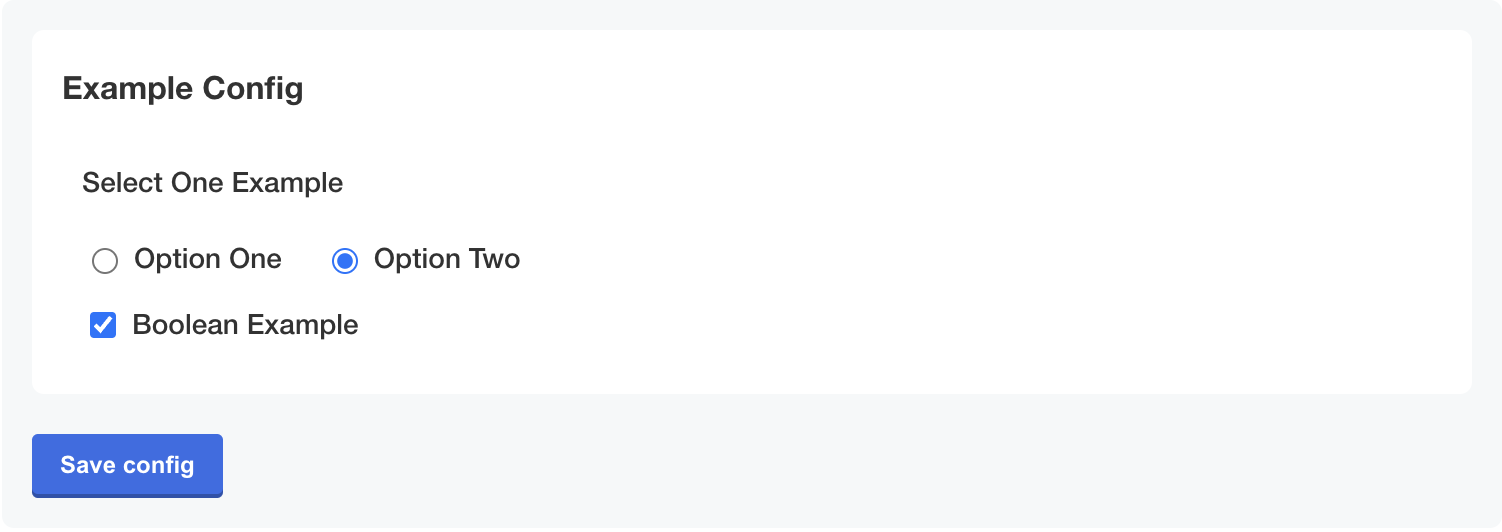
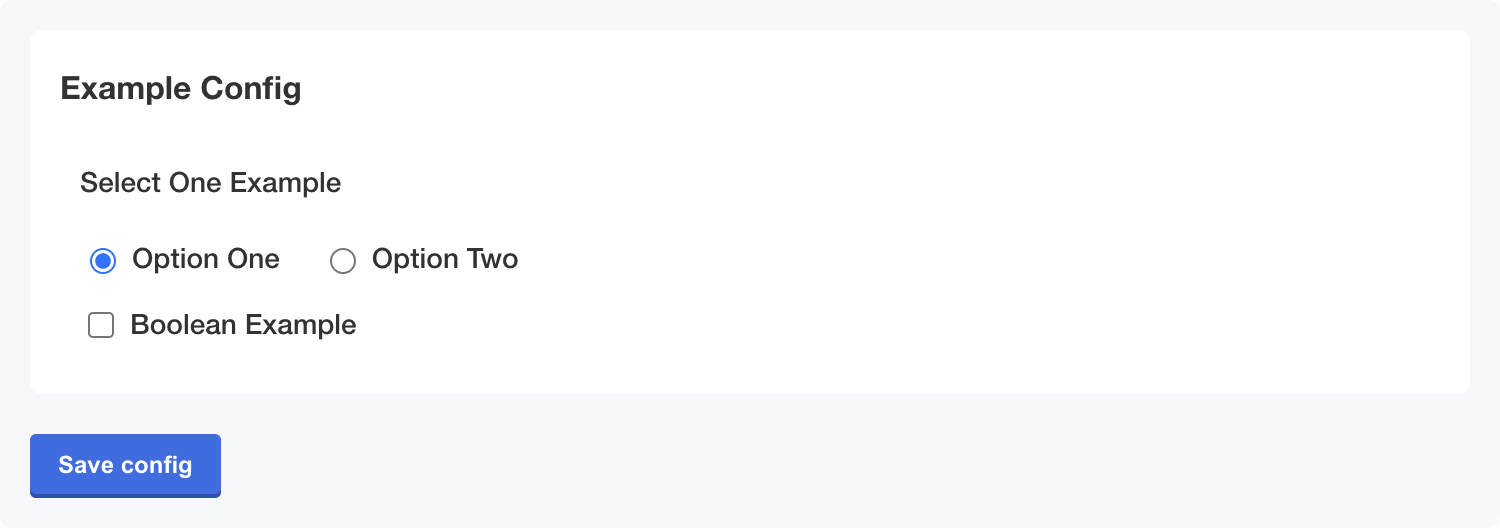
Alternatively, if either `Option One` or `Boolean Example` is not selected, then the conditional statement evaluates to false and the `Conditional Item` field is not displayed:
[View a larger version of this image](/images/conditional-item-true.png)
Alternatively, if either `Option One` or `Boolean Example` is not selected, then the conditional statement evaluates to false and the `Conditional Item` field is not displayed:
 [View a larger version of this image](/images/conditional-item-false-option-two.png)
 [View a larger version of this image](/images/conditional-item-false-boolean.png)
## Conditional statement examples
This section includes examples of using Replicated template functions to construct conditional statements. Conditional statements can be used with Replicated template functions to render different values depending on a given condition.
### If-else statements
A common use case for if-else statements with Replicated template functions is to set values for resources or objects deployed by your application, such as custom annotations or service types, based on user-specific data.
This section includes examples of both single line and multi-line if-else statements. Using multi-line formatting can be useful to improve the readability of YAML files when longer or more complex if-else statements are needed.
Multi-line if-else statements can be constructed using YAML block scalars and block chomping characters to ensure the rendered result is valid YAML. A _folded_ block scalar style is denoted using the greater than (`>`) character. With the folded style, single line breaks in the string are treated as a space. Additionally, the block chomping minus (`-`) character is used to remove all the line breaks at the end of a string. For more information about working with these characters, see [Block Style Productions](https://yaml.org/spec/1.2.2/#chapter-8-block-style-productions) in the YAML documentation.
:::note
For Helm-based applications that need to use more complex or nested if-else statements, you can alternatively use templating within your Helm chart `templates` rather than in the KOTS HelmChart custom resource. For more information, see [If/Else](https://helm.sh/docs/chart_template_guide/control_structures/#ifelse) in the Helm documentation.
:::
#### Single line
The following example shows if-else statements used in the KOTS HelmChart custom resource `values` field to render different values depending on if the user selects a load balancer or an ingress controller as the ingress type for the application. This example uses the KOTS [ConfigOptionEquals](/reference/template-functions-config-context#configoptionequals) template function to return a boolean that evaluates to true if the configuration option value is equal to the supplied value.
```yaml
# KOTS HelmChart custom resource
apiVersion: kots.io/v1beta2
kind: HelmChart
metadata:
name: my-app
spec:
chart:
name: my-app
chartVersion: 0.23.0
values:
services:
my-service:
enabled: true
appName: ["my-app"]
# Render the service type based on the user's selection
# '{{repl ...}}' syntax is used for `type` to improve readability of the if-else statement and render a string
type: '{{repl if ConfigOptionEquals "ingress_type" "load_balancer" }}LoadBalancer{{repl else }}ClusterIP{{repl end }}'
ports:
http:
enabled: true
# Render the HTTP port for the service depending on the user's selection
# repl{{ ... }} syntax is used for `port` to render an integer value
port: repl{{ if ConfigOptionEquals "ingress_type" "load_balancer" }}repl{{ ConfigOption "load_balancer_port" }}repl{{ else }}8081repl{{ end }}
protocol: HTTP
targetPort: 8081
```
#### Multi-line in KOTS HelmChart values
The following example uses a multi-line if-else statement in the KOTS HelmChart custom resource to render the path to the Replicated SDK image depending on if the user pushed images to a local private registry.
This example uses the following Replicated template functions:
* [HasLocalRegistry](/reference/template-functions-config-context#haslocalregistry) to return true if the environment is configured to rewrite images to a local registry
* [LocalRegistryHost](/reference/template-functions-config-context#localregistryhost) to return the local registry host configured by the user
* [LocalRegistryNamespace](/reference/template-functions-config-context#localregistrynamespace) to return the local registry namespace configured by the user
:::note
This example uses the `{{repl ...}}` syntax rather than the `repl{{ ... }}` syntax to improve readability in the YAML file. However, both syntaxes are supported for this use case. For more information, see [Syntax](/reference/template-functions-about#syntax) in _About Template Functions_.
:::
```yaml
# KOTS HelmChart custom resource
apiVersion: kots.io/v1beta2
kind: HelmChart
metadata:
name: samplechart
spec:
values:
images:
replicated-sdk: >-
{{repl if HasLocalRegistry -}}
{{repl LocalRegistryHost }}/{{repl LocalRegistryNamespace }}/replicated-sdk:1.0.0-beta.29
{{repl else -}}
docker.io/replicated/replicated-sdk:1.0.0-beta.29
{{repl end}}
```
Given the example above, if the user is _not_ using a local registry, then the `replicated-sdk` value in the Helm chart is set to the location of the image on the default docker registry, as shown below:
```yaml
# Helm chart values file
images:
replicated-sdk: 'docker.io/replicated/replicated-sdk:1.0.0-beta.29'
```
#### Multi-line in Secret object
The following example uses multi-line if-else statements in a Secret object deployed by KOTS to conditionally set the database hostname, port, username, and password depending on if the customer uses the database embedded with the application or brings their own external database.
This example uses the following Replicated template functions:
* [ConfigOptionEquals](/reference/template-functions-config-context#configoptionequals) to return a boolean that evaluates to true if the configuration option value is equal to the supplied value
* [ConfigOption](/reference/template-functions-config-context#configoption) to return the user-supplied value for the specified configuration option
* [Base64Encode](/reference/template-functions-static-context#base64encode) to encode the string with base64
:::note
This example uses the `{{repl ...}}` syntax rather than the `repl{{ ... }}` syntax to improve readability in the YAML file. However, both syntaxes are supported for this use case. For more information, see [Syntax](/reference/template-functions-about#syntax) in _About Template Functions_.
:::
```yaml
# Postgres Secret
apiVersion: v1
kind: Secret
metadata:
name: postgres
data:
# Render the value for the database hostname depending on if an embedded or
# external db is used.
# Also, base64 encode the rendered value.
DB_HOST: >-
{{repl if ConfigOptionEquals "postgres_type" "embedded_postgres" -}}
{{repl Base64Encode "postgres" }}
{{repl else -}}
{{repl ConfigOption "external_postgres_host" | Base64Encode }}
{{repl end}}
DB_PORT: >-
{{repl if ConfigOptionEquals "postgres_type" "embedded_postgres" -}}
{{repl Base64Encode "5432" }}
{{repl else -}}
{{repl ConfigOption "external_postgres_port" | Base64Encode }}
{{repl end}}
DB_USER: >-
{{repl if ConfigOptionEquals "postgres_type" "embedded_postgres" -}}
{{repl Base64Encode "postgres" }}
{{repl else -}}
{{repl ConfigOption "external_postgres_user" | Base64Encode }}
{{repl end}}
DB_PASSWORD: >-
{{repl if ConfigOptionEquals "postgres_type" "embedded_postgres" -}}
{{repl ConfigOption "embedded_postgres_password" | Base64Encode }}
{{repl else -}}
{{repl ConfigOption "external_postgres_password" | Base64Encode }}
{{repl end}}
```
### Ternary operators
Ternary operators are useful for templating strings where certain values within the string must be rendered differently depending on a given condition. Compared to if-else statements, ternary operators are useful when a small portion of a string needs to be conditionally rendered, as opposed to rendering different values based on a conditional statement. For example, a common use case for ternary operators is to template the path to an image repository based on user-supplied values.
The following example uses ternary operators to render the registry and repository for a private nginx image depending on if a local image regsitry is used. This example uses the following Replicated template functions:
* [HasLocalRegistry](/reference/template-functions-config-context#haslocalregistry) to return true if the environment is configured to rewrite images to a local registry
* [LocalRegistryHost](/reference/template-functions-config-context#localregistryhost) to return the local registry host configured by the user
* [LocalRegistryNamespace](/reference/template-functions-config-context#localregistrynamespace) to return the local registry namespace configured by the user
```yaml
# KOTS HelmChart custom resource
apiVersion: kots.io/v1beta2
kind: HelmChart
metadata:
name: samplechart
spec:
values:
image:
# If a local registry is configured, use the local registry host.
# Otherwise, use proxy.replicated.com
registry: repl{{ HasLocalRegistry | ternary LocalRegistryHost "proxy.replicated.com" }}
# If a local registry is configured, use the local registry's namespace.
# Otherwise, use proxy/my-app/quay.io/my-org
repository: repl{{ HasLocalRegistry | ternary LocalRegistryNamespace "proxy/my-app/quay.io/my-org" }}/nginx
tag: v1.0.1
```
## Formatting examples
This section includes examples of how to format the rendered output of Replicated template functions.
In addition to the examples in this section, Replicated template functions in the Static context include several options for formatting values, such as converting strings to upper or lower case and trimming leading and trailing space characters. For more information, see [Static Context](/reference/template-functions-static-context).
### Indentation
When using template functions within nested YAML, it is important that the rendered template functions are indented correctly so that the YAML renders. A common use case for adding indentation to Replicated template functions is when templating annotations in the metadata of resources or objects deployed by your application based on user-supplied values.
The [nindent](https://masterminds.github.io/sprig/strings.html) function can be used to prepend a new line to the beginning of the string and indent the string by a specified number of spaces.
#### Indent templated Helm chart values
The following example shows templating a Helm chart value that sets annotations for an Ingress object. This example uses the KOTS [ConfigOption](/reference/template-functions-config-context#configoption) template function to return user-supplied annotations from the Admin Console **Config** page. It also uses [nindent](https://masterminds.github.io/sprig/strings.html) to indent the rendered value ten spaces.
```yaml
# KOTS HelmChart custom resource
apiVersion: kots.io/v1beta2
kind: HelmChart
metadata:
name: myapp
spec:
values:
services:
myservice:
annotations: repl{{ ConfigOption "additional_annotations" | nindent 10 }}
```
#### Indent templated annotations in manifest files
The following example shows templating annotations for an Ingress object. This example uses the KOTS [ConfigOption](/reference/template-functions-config-context#configoption) template function to return user-supplied annotations from the Admin Console **Config** page. It also uses [nindent](https://masterminds.github.io/sprig/strings.html) to indent the rendered value four spaces.
```yaml
apiVersion: extensions/v1beta1
kind: Ingress
metadata:
name: example-ingress
annotations:
kots.io/placeholder: |-
repl{{ ConfigOption "ingress_annotations" | nindent 4 }}
```
### Render quoted values
To wrap a rendered value in quotes, you can pipe the result from Replicated template functions with the `repl{{ ... }}` syntax into quotes using `| quote`. Or, you can use the `'{{repl ... }}'` syntax instead.
One use case for quoted values in YAML is when indicator characters are included in values. In YAML, indicator characters (`-`, `?`, `:`) have special semantics and must be escaped if used in values. For more information, see [Indicator Charactors](https://yaml.org/spec/1.2.2/#53-indicator-characters) in the YAML documentation.
#### Example with `'{{repl ... }}'` syntax
```yaml
customTag: '{{repl ConfigOption "tag" }}'
```
#### Example with `| quote`
```yaml
customTag: repl{{ ConfigOption "tag" | quote }}
```
The result for both examples is:
```yaml
customTag: 'key: value'
```
## Variables example
This section includes an example of using variables with Replicated template functions. For more information, see [Variables](https://pkg.go.dev/text/template#hdr-Variables) in the Go documentation.
### Using variables to generate TLS certificates in JSON
You can use the Sprig [genCA](https://masterminds.github.io/sprig/crypto.html) and [genSignedCert](https://masterminds.github.io/sprig/crypto.html) functions with Replicated template functions to generate certificate authorities (CAs) and signed certificates in JSON. One use case for this is to generate default CAs, certificates, and keys that users can override with their own values on the Admin Console **Config** page.
The Sprig [genCA](https://masterminds.github.io/sprig/crypto.html) and [genSignedCert](https://masterminds.github.io/sprig/crypto.html) functions require the subject's common name and the certificate's validity duration in days. The `genSignedCert` function also requires the CA that will sign the certificate. You can use variables and Replicated template functions to provide the necessary parameters when calling these functions.
The following example shows how to use variables and Replicated template functions in the `default` property of a [`hidden`](/reference/custom-resource-config#hidden) item to pass parameters to the `genCA` and `genSignedCert` functions and generate a CA, certificate, and key. This example uses a `hidden` item (which is an item that is not displayed on the **Config** page) to generate the certificate chain because variables used in the KOTS Config custom resource can only be accessed from the same item where they were declared. For this reason, `hidden` items can be useful for evaluating complex templates.
This example uses the following:
* KOTS [ConfigOption](/reference/template-functions-config-context#configoption) template function to render the user-supplied value for the ingress hostname. This is passed as a parameter to the [genCA](https://masterminds.github.io/sprig/crypto.html) and [genSignedCert](https://masterminds.github.io/sprig/crypto.html) functions
* Sprig [genCA](https://masterminds.github.io/sprig/crypto.html) and [genSignedCert](https://masterminds.github.io/sprig/crypto.html) functions to generate a CA and a certificate signed by the CA
* Sprig [dict](https://masterminds.github.io/sprig/dicts.html), [set](https://masterminds.github.io/sprig/dicts.html), and [dig](https://masterminds.github.io/sprig/dicts.html) dictionary functions to create a dictionary with entries for both the CA and the certificate, then traverse the dictionary to return the values of the CA, certificate, and key.
* [toJson](https://masterminds.github.io/sprig/defaults.html) and [fromJson](https://masterminds.github.io/sprig/defaults.html) Sprig functions to encode the CA and certificate into a JSON string, then decode the JSON for the purpose of displaying the values on the **Config** page as defaults
:::important
Default values are treated as ephemeral. The following certificate chain is recalculated each time the application configuration is modified. Before using this example with your application, be sure that your application can handle updating these parameters dynamically.
:::
```yaml
apiVersion: kots.io/v1beta1
kind: Config
metadata:
name: config-sample
spec:
groups:
- name: example_settings
title: My Example Config
items:
- name: ingress_hostname
title: Ingress Hostname
help_text: Enter a DNS hostname to use as the cert's CN.
type: text
- name: tls_json
title: TLS JSON
type: textarea
hidden: true
default: |-
repl{{ $ca := genCA (ConfigOption "ingress_hostname") 365 }}
repl{{ $tls := dict "ca" $ca }}
repl{{ $cert := genSignedCert (ConfigOption "ingress_hostname") (list ) (list (ConfigOption "ingress_hostname")) 365 $ca }}
repl{{ $_ := set $tls "cert" $cert }}
repl{{ toJson $tls }}
- name: tls_ca
title: Signing Authority
type: textarea
default: repl{{ fromJson (ConfigOption "tls_json") | dig "ca" "Cert" "" }}
- name: tls_cert
title: TLS Cert
type: textarea
default: repl{{ fromJson (ConfigOption "tls_json") | dig "cert" "Cert" "" }}
- name: tls_key
title: TLS Key
type: textarea
default: repl{{ fromJson (ConfigOption "tls_json") | dig "cert" "Key" "" }}
```
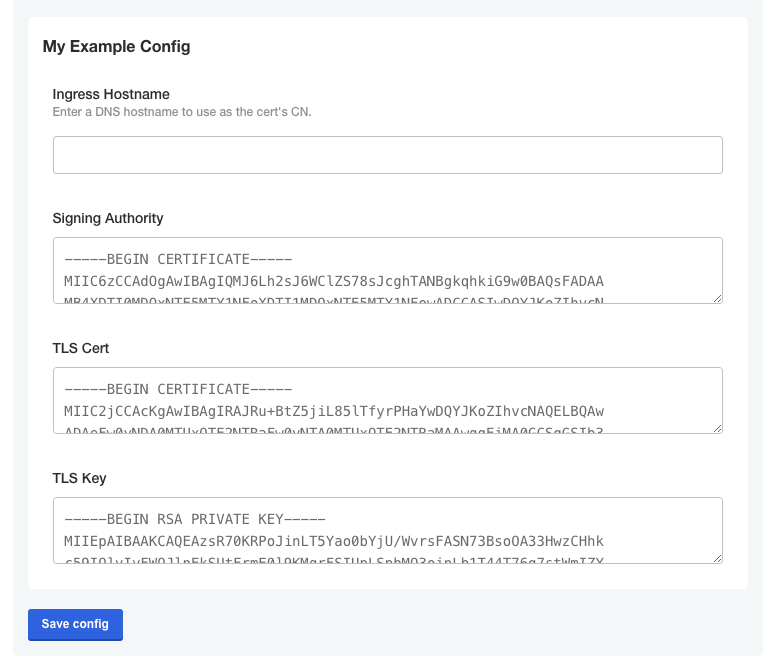
The following image shows how the default values for the CA, certificate, and key are displayed on the **Config** page:
[View a larger version of this image](/images/conditional-item-false-boolean.png)
## Conditional statement examples
This section includes examples of using Replicated template functions to construct conditional statements. Conditional statements can be used with Replicated template functions to render different values depending on a given condition.
### If-else statements
A common use case for if-else statements with Replicated template functions is to set values for resources or objects deployed by your application, such as custom annotations or service types, based on user-specific data.
This section includes examples of both single line and multi-line if-else statements. Using multi-line formatting can be useful to improve the readability of YAML files when longer or more complex if-else statements are needed.
Multi-line if-else statements can be constructed using YAML block scalars and block chomping characters to ensure the rendered result is valid YAML. A _folded_ block scalar style is denoted using the greater than (`>`) character. With the folded style, single line breaks in the string are treated as a space. Additionally, the block chomping minus (`-`) character is used to remove all the line breaks at the end of a string. For more information about working with these characters, see [Block Style Productions](https://yaml.org/spec/1.2.2/#chapter-8-block-style-productions) in the YAML documentation.
:::note
For Helm-based applications that need to use more complex or nested if-else statements, you can alternatively use templating within your Helm chart `templates` rather than in the KOTS HelmChart custom resource. For more information, see [If/Else](https://helm.sh/docs/chart_template_guide/control_structures/#ifelse) in the Helm documentation.
:::
#### Single line
The following example shows if-else statements used in the KOTS HelmChart custom resource `values` field to render different values depending on if the user selects a load balancer or an ingress controller as the ingress type for the application. This example uses the KOTS [ConfigOptionEquals](/reference/template-functions-config-context#configoptionequals) template function to return a boolean that evaluates to true if the configuration option value is equal to the supplied value.
```yaml
# KOTS HelmChart custom resource
apiVersion: kots.io/v1beta2
kind: HelmChart
metadata:
name: my-app
spec:
chart:
name: my-app
chartVersion: 0.23.0
values:
services:
my-service:
enabled: true
appName: ["my-app"]
# Render the service type based on the user's selection
# '{{repl ...}}' syntax is used for `type` to improve readability of the if-else statement and render a string
type: '{{repl if ConfigOptionEquals "ingress_type" "load_balancer" }}LoadBalancer{{repl else }}ClusterIP{{repl end }}'
ports:
http:
enabled: true
# Render the HTTP port for the service depending on the user's selection
# repl{{ ... }} syntax is used for `port` to render an integer value
port: repl{{ if ConfigOptionEquals "ingress_type" "load_balancer" }}repl{{ ConfigOption "load_balancer_port" }}repl{{ else }}8081repl{{ end }}
protocol: HTTP
targetPort: 8081
```
#### Multi-line in KOTS HelmChart values
The following example uses a multi-line if-else statement in the KOTS HelmChart custom resource to render the path to the Replicated SDK image depending on if the user pushed images to a local private registry.
This example uses the following Replicated template functions:
* [HasLocalRegistry](/reference/template-functions-config-context#haslocalregistry) to return true if the environment is configured to rewrite images to a local registry
* [LocalRegistryHost](/reference/template-functions-config-context#localregistryhost) to return the local registry host configured by the user
* [LocalRegistryNamespace](/reference/template-functions-config-context#localregistrynamespace) to return the local registry namespace configured by the user
:::note
This example uses the `{{repl ...}}` syntax rather than the `repl{{ ... }}` syntax to improve readability in the YAML file. However, both syntaxes are supported for this use case. For more information, see [Syntax](/reference/template-functions-about#syntax) in _About Template Functions_.
:::
```yaml
# KOTS HelmChart custom resource
apiVersion: kots.io/v1beta2
kind: HelmChart
metadata:
name: samplechart
spec:
values:
images:
replicated-sdk: >-
{{repl if HasLocalRegistry -}}
{{repl LocalRegistryHost }}/{{repl LocalRegistryNamespace }}/replicated-sdk:1.0.0-beta.29
{{repl else -}}
docker.io/replicated/replicated-sdk:1.0.0-beta.29
{{repl end}}
```
Given the example above, if the user is _not_ using a local registry, then the `replicated-sdk` value in the Helm chart is set to the location of the image on the default docker registry, as shown below:
```yaml
# Helm chart values file
images:
replicated-sdk: 'docker.io/replicated/replicated-sdk:1.0.0-beta.29'
```
#### Multi-line in Secret object
The following example uses multi-line if-else statements in a Secret object deployed by KOTS to conditionally set the database hostname, port, username, and password depending on if the customer uses the database embedded with the application or brings their own external database.
This example uses the following Replicated template functions:
* [ConfigOptionEquals](/reference/template-functions-config-context#configoptionequals) to return a boolean that evaluates to true if the configuration option value is equal to the supplied value
* [ConfigOption](/reference/template-functions-config-context#configoption) to return the user-supplied value for the specified configuration option
* [Base64Encode](/reference/template-functions-static-context#base64encode) to encode the string with base64
:::note
This example uses the `{{repl ...}}` syntax rather than the `repl{{ ... }}` syntax to improve readability in the YAML file. However, both syntaxes are supported for this use case. For more information, see [Syntax](/reference/template-functions-about#syntax) in _About Template Functions_.
:::
```yaml
# Postgres Secret
apiVersion: v1
kind: Secret
metadata:
name: postgres
data:
# Render the value for the database hostname depending on if an embedded or
# external db is used.
# Also, base64 encode the rendered value.
DB_HOST: >-
{{repl if ConfigOptionEquals "postgres_type" "embedded_postgres" -}}
{{repl Base64Encode "postgres" }}
{{repl else -}}
{{repl ConfigOption "external_postgres_host" | Base64Encode }}
{{repl end}}
DB_PORT: >-
{{repl if ConfigOptionEquals "postgres_type" "embedded_postgres" -}}
{{repl Base64Encode "5432" }}
{{repl else -}}
{{repl ConfigOption "external_postgres_port" | Base64Encode }}
{{repl end}}
DB_USER: >-
{{repl if ConfigOptionEquals "postgres_type" "embedded_postgres" -}}
{{repl Base64Encode "postgres" }}
{{repl else -}}
{{repl ConfigOption "external_postgres_user" | Base64Encode }}
{{repl end}}
DB_PASSWORD: >-
{{repl if ConfigOptionEquals "postgres_type" "embedded_postgres" -}}
{{repl ConfigOption "embedded_postgres_password" | Base64Encode }}
{{repl else -}}
{{repl ConfigOption "external_postgres_password" | Base64Encode }}
{{repl end}}
```
### Ternary operators
Ternary operators are useful for templating strings where certain values within the string must be rendered differently depending on a given condition. Compared to if-else statements, ternary operators are useful when a small portion of a string needs to be conditionally rendered, as opposed to rendering different values based on a conditional statement. For example, a common use case for ternary operators is to template the path to an image repository based on user-supplied values.
The following example uses ternary operators to render the registry and repository for a private nginx image depending on if a local image regsitry is used. This example uses the following Replicated template functions:
* [HasLocalRegistry](/reference/template-functions-config-context#haslocalregistry) to return true if the environment is configured to rewrite images to a local registry
* [LocalRegistryHost](/reference/template-functions-config-context#localregistryhost) to return the local registry host configured by the user
* [LocalRegistryNamespace](/reference/template-functions-config-context#localregistrynamespace) to return the local registry namespace configured by the user
```yaml
# KOTS HelmChart custom resource
apiVersion: kots.io/v1beta2
kind: HelmChart
metadata:
name: samplechart
spec:
values:
image:
# If a local registry is configured, use the local registry host.
# Otherwise, use proxy.replicated.com
registry: repl{{ HasLocalRegistry | ternary LocalRegistryHost "proxy.replicated.com" }}
# If a local registry is configured, use the local registry's namespace.
# Otherwise, use proxy/my-app/quay.io/my-org
repository: repl{{ HasLocalRegistry | ternary LocalRegistryNamespace "proxy/my-app/quay.io/my-org" }}/nginx
tag: v1.0.1
```
## Formatting examples
This section includes examples of how to format the rendered output of Replicated template functions.
In addition to the examples in this section, Replicated template functions in the Static context include several options for formatting values, such as converting strings to upper or lower case and trimming leading and trailing space characters. For more information, see [Static Context](/reference/template-functions-static-context).
### Indentation
When using template functions within nested YAML, it is important that the rendered template functions are indented correctly so that the YAML renders. A common use case for adding indentation to Replicated template functions is when templating annotations in the metadata of resources or objects deployed by your application based on user-supplied values.
The [nindent](https://masterminds.github.io/sprig/strings.html) function can be used to prepend a new line to the beginning of the string and indent the string by a specified number of spaces.
#### Indent templated Helm chart values
The following example shows templating a Helm chart value that sets annotations for an Ingress object. This example uses the KOTS [ConfigOption](/reference/template-functions-config-context#configoption) template function to return user-supplied annotations from the Admin Console **Config** page. It also uses [nindent](https://masterminds.github.io/sprig/strings.html) to indent the rendered value ten spaces.
```yaml
# KOTS HelmChart custom resource
apiVersion: kots.io/v1beta2
kind: HelmChart
metadata:
name: myapp
spec:
values:
services:
myservice:
annotations: repl{{ ConfigOption "additional_annotations" | nindent 10 }}
```
#### Indent templated annotations in manifest files
The following example shows templating annotations for an Ingress object. This example uses the KOTS [ConfigOption](/reference/template-functions-config-context#configoption) template function to return user-supplied annotations from the Admin Console **Config** page. It also uses [nindent](https://masterminds.github.io/sprig/strings.html) to indent the rendered value four spaces.
```yaml
apiVersion: extensions/v1beta1
kind: Ingress
metadata:
name: example-ingress
annotations:
kots.io/placeholder: |-
repl{{ ConfigOption "ingress_annotations" | nindent 4 }}
```
### Render quoted values
To wrap a rendered value in quotes, you can pipe the result from Replicated template functions with the `repl{{ ... }}` syntax into quotes using `| quote`. Or, you can use the `'{{repl ... }}'` syntax instead.
One use case for quoted values in YAML is when indicator characters are included in values. In YAML, indicator characters (`-`, `?`, `:`) have special semantics and must be escaped if used in values. For more information, see [Indicator Charactors](https://yaml.org/spec/1.2.2/#53-indicator-characters) in the YAML documentation.
#### Example with `'{{repl ... }}'` syntax
```yaml
customTag: '{{repl ConfigOption "tag" }}'
```
#### Example with `| quote`
```yaml
customTag: repl{{ ConfigOption "tag" | quote }}
```
The result for both examples is:
```yaml
customTag: 'key: value'
```
## Variables example
This section includes an example of using variables with Replicated template functions. For more information, see [Variables](https://pkg.go.dev/text/template#hdr-Variables) in the Go documentation.
### Using variables to generate TLS certificates in JSON
You can use the Sprig [genCA](https://masterminds.github.io/sprig/crypto.html) and [genSignedCert](https://masterminds.github.io/sprig/crypto.html) functions with Replicated template functions to generate certificate authorities (CAs) and signed certificates in JSON. One use case for this is to generate default CAs, certificates, and keys that users can override with their own values on the Admin Console **Config** page.
The Sprig [genCA](https://masterminds.github.io/sprig/crypto.html) and [genSignedCert](https://masterminds.github.io/sprig/crypto.html) functions require the subject's common name and the certificate's validity duration in days. The `genSignedCert` function also requires the CA that will sign the certificate. You can use variables and Replicated template functions to provide the necessary parameters when calling these functions.
The following example shows how to use variables and Replicated template functions in the `default` property of a [`hidden`](/reference/custom-resource-config#hidden) item to pass parameters to the `genCA` and `genSignedCert` functions and generate a CA, certificate, and key. This example uses a `hidden` item (which is an item that is not displayed on the **Config** page) to generate the certificate chain because variables used in the KOTS Config custom resource can only be accessed from the same item where they were declared. For this reason, `hidden` items can be useful for evaluating complex templates.
This example uses the following:
* KOTS [ConfigOption](/reference/template-functions-config-context#configoption) template function to render the user-supplied value for the ingress hostname. This is passed as a parameter to the [genCA](https://masterminds.github.io/sprig/crypto.html) and [genSignedCert](https://masterminds.github.io/sprig/crypto.html) functions
* Sprig [genCA](https://masterminds.github.io/sprig/crypto.html) and [genSignedCert](https://masterminds.github.io/sprig/crypto.html) functions to generate a CA and a certificate signed by the CA
* Sprig [dict](https://masterminds.github.io/sprig/dicts.html), [set](https://masterminds.github.io/sprig/dicts.html), and [dig](https://masterminds.github.io/sprig/dicts.html) dictionary functions to create a dictionary with entries for both the CA and the certificate, then traverse the dictionary to return the values of the CA, certificate, and key.
* [toJson](https://masterminds.github.io/sprig/defaults.html) and [fromJson](https://masterminds.github.io/sprig/defaults.html) Sprig functions to encode the CA and certificate into a JSON string, then decode the JSON for the purpose of displaying the values on the **Config** page as defaults
:::important
Default values are treated as ephemeral. The following certificate chain is recalculated each time the application configuration is modified. Before using this example with your application, be sure that your application can handle updating these parameters dynamically.
:::
```yaml
apiVersion: kots.io/v1beta1
kind: Config
metadata:
name: config-sample
spec:
groups:
- name: example_settings
title: My Example Config
items:
- name: ingress_hostname
title: Ingress Hostname
help_text: Enter a DNS hostname to use as the cert's CN.
type: text
- name: tls_json
title: TLS JSON
type: textarea
hidden: true
default: |-
repl{{ $ca := genCA (ConfigOption "ingress_hostname") 365 }}
repl{{ $tls := dict "ca" $ca }}
repl{{ $cert := genSignedCert (ConfigOption "ingress_hostname") (list ) (list (ConfigOption "ingress_hostname")) 365 $ca }}
repl{{ $_ := set $tls "cert" $cert }}
repl{{ toJson $tls }}
- name: tls_ca
title: Signing Authority
type: textarea
default: repl{{ fromJson (ConfigOption "tls_json") | dig "ca" "Cert" "" }}
- name: tls_cert
title: TLS Cert
type: textarea
default: repl{{ fromJson (ConfigOption "tls_json") | dig "cert" "Cert" "" }}
- name: tls_key
title: TLS Key
type: textarea
default: repl{{ fromJson (ConfigOption "tls_json") | dig "cert" "Key" "" }}
```
The following image shows how the default values for the CA, certificate, and key are displayed on the **Config** page:
 [View a larger version of this image](/images/certificate-chain-default-values.png)
## Additional examples
The following topics include additional examples of using Replicated template functions:
* [Add Status Informers](/vendor/admin-console-display-app-status#add-status-informers) in _Adding Resource Status Informers_
* [Conditionally Including or Excluding Resources](/vendor/packaging-include-resources)
* [Templating Annotations](/vendor/resources-annotations-templating)
[View a larger version of this image](/images/certificate-chain-default-values.png)
## Additional examples
The following topics include additional examples of using Replicated template functions:
* [Add Status Informers](/vendor/admin-console-display-app-status#add-status-informers) in _Adding Resource Status Informers_
* [Conditionally Including or Excluding Resources](/vendor/packaging-include-resources)
* [Templating Annotations](/vendor/resources-annotations-templating)